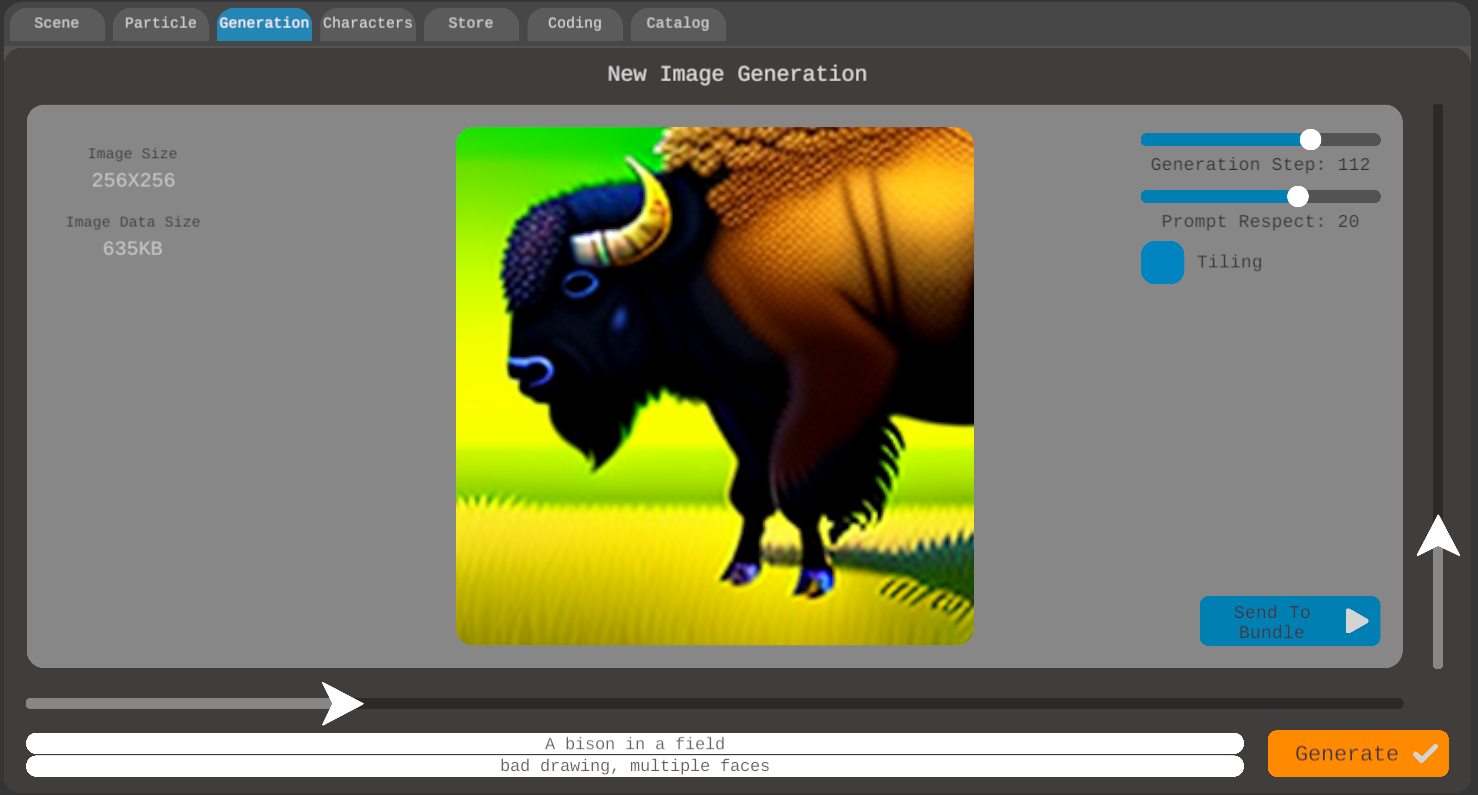
Generation
The Generation component integrates AI image generation capabilities directly into your game development workflow, allowing you to create custom assets through text prompts.
Using the sliders in the Generation component, you can define the size of your generated image. Any size from 32x32 to 1024x1024 is possible, but remember, bigger image means bigger image data size.
Generation step option controls the balance between speed and quality. Working with lower steps, between 20 and 50, provides faster results but with less detail. Medium steps, ranging from 50 to 100, offer a balanced approach suitable for most projects. For maximum quality, particularly for final assets, you can use higher steps (100+), though this will increase generation time. We recommend starting with 50 steps and adjusting based on your specific needs.
The tiling option creates seamlessly repeating textures perfect for backgrounds, surfaces, and environmental effects. When enabled, this feature ensures proper edge matching for perfect tiling, though it may require higher generation steps to maintain quality. This option is particularly valuable for creating game-ready textures and patterns that need to repeat without visible seams.
The image generation prompt has two components: your main prompt to clearly describe what you want to generate, and style modifiers to guide the artistic direction. For instance, you might use a main prompt like “A bison in a field” with a style modifier like “bad drawing, multiple faces”.