Characters
The Characters component serves as a comprehensive character management system for your game, offering two basic options: uploading existing character components and creating entirely new characters through a guided wizard.
Upload Character Components
You can upload four different types of models for your characters:
- Base characters to act as your base, a head, two arms and two legs.
- Skins to go on your base characters, to offer visual variations.
- Faces to define unique facial expressions.
- Accessories to further customize your characters.
Each uploaded component becomes immediately available in your character library, ready to be combined with other elements. The system supports multiple file formats and automatically processes uploads.
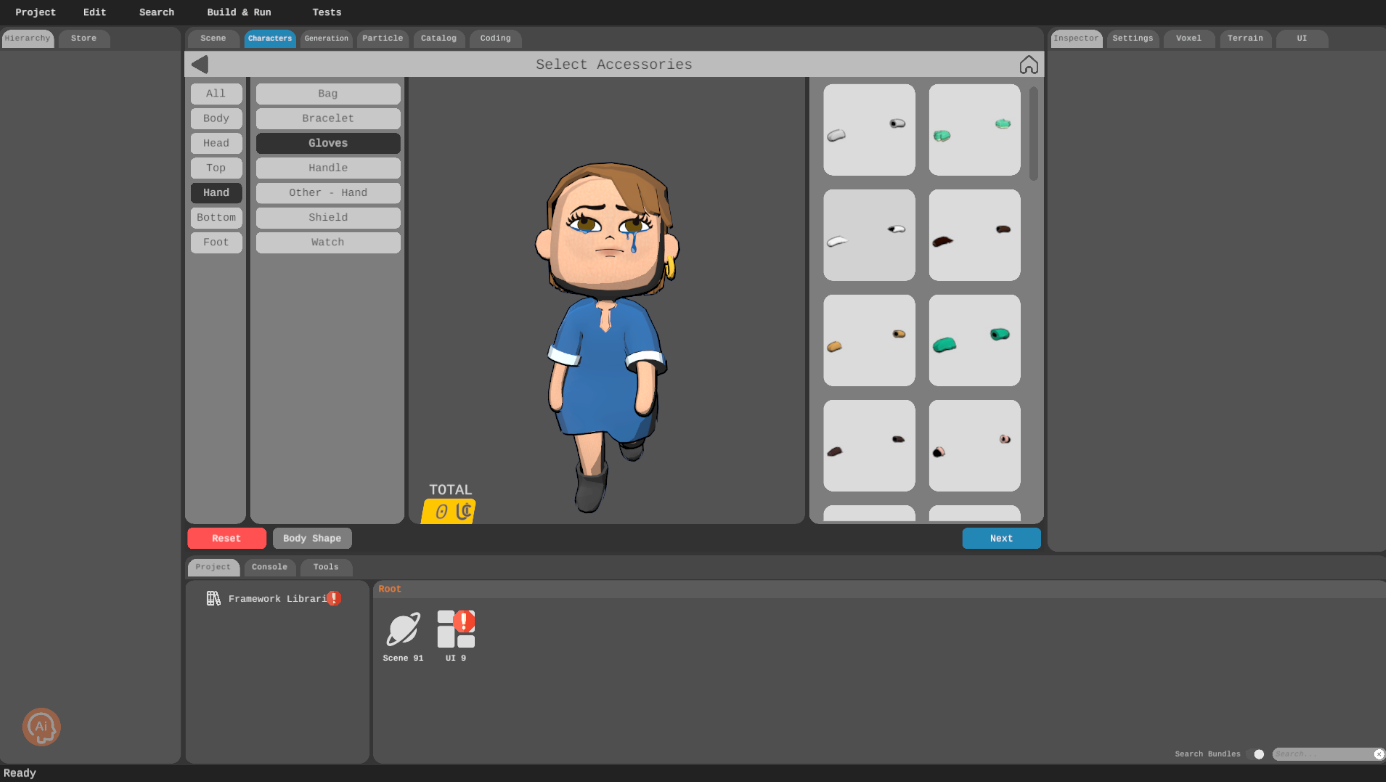
Character Creation Wizard
The creation wizard provides a step-by-step journey for developing new characters, guiding developers through a systematic process of character design. Your journey begins with selecting a base character model, which establishes the fundamental shape, proportions, and potential animation rigs.
After establishing the base, you’ll select a skin that defines the visual texture and appearance. This step determines the character’s color palette, surface details, and overall aesthetic. The face selection follows, allowing you to choose or customize facial features that bring individuality to your character.
The final stage involves accessorizing your character. Here, you can add things like clothes, hats, glasses, masks, hair, shoes and more to define the personality of your character.
Throughout the wizard, real-time previews allow you to see how each selection impacts the overall character design. Your choice is almost never final; you can always go back and update your character to your liking with different combinations.